Cyclic Alarms: Shift Schedule Alarm Tool
Cyclic Alarms is an alarm app by Pramod Beema that repeats alerts every N days from a chosen start date for non-weekly shift schedules.
Install Cyclic Alarms · v1.7.1Cyclic Alarms is designed for people with rotating rosters or shift work that does not fit a standard Monday to Friday pattern. Unlike most alarm apps limited to weekly repeats, Cyclic Alarms lets users set an interval of any number of days from a start date, and the alarm fires automatically on that cycle.
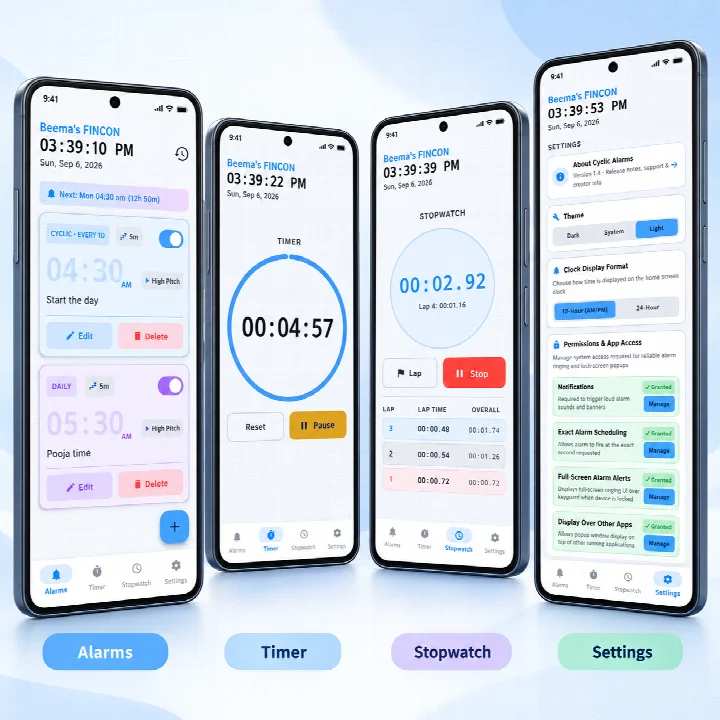
Screenshots
- Version
- 1.7.1
- Size
- 1.9 MB
- Requires Android
- 7.0
- Updated
- Oct 25, 2026
- Category
- Tools
- Developer
- Pramod Beema
- Package
- com.beemasfincon.cyclicalarms
- Free
- ✓
Cyclic Alarms is a tools app by Pramod Beema that lets you set alarms that repeat every N days from a chosen start date, instead of only weekly. It is designed for people whose schedules follow rotating shifts, work cycles, or any repeating pattern that does not fit the standard Monday-to-Friday week. The app is free, contains no ads, and does not require any sign-in or tracking.
Most alarm apps assume a weekly routine. If your work pattern repeats every 3 days or every 5 days, you normally have to set each alarm manually every time. Cyclic Alarms solves this by letting you pick a start date and an interval, and the alarm will fire on that cycle indefinitely. It also supports traditional weekly alarms for those who prefer that, as well as multiple countdown timers and a stopwatch with lap recording.
The app is lightweight at 1.8 MB and works on devices running Android 7.0 or later. It includes eight built-in synth alarm sounds generated in code, or you can use any audio file from your device. The interface offers a true AMOLED black dark mode, a bright theme, and a system option with a brightness slider. It can ring even in Silent or Do Not Disturb mode, and it keeps a history log of past alarms. This makes it a practical tool for shift workers, students with rotating class schedules, or anyone who needs a repeating reminder that does not align with a weekly calendar.
Key features
- Cyclic alarms that repeat every N days from a start date
- Weekly alarms with any combination of weekdays
- Up to 5 independent countdown timers running simultaneously
- Stopwatch with lap recording
- Background timer and stopwatch via a foreground service
- 8 built-in synth alarm sounds generated in code, no audio files bundled
- Custom audio: use any audio file from your device
- Rings in Silent and DND mode
- Pure dark mode with true AMOLED black, plus dark/light/system themes and a brightness slider
- Per-alarm snooze duration with live on-screen +/- adjustments
How to install
- Tap the download button on this page to get the APK file (1.8 MB).
- When Android asks, allow your browser or file manager to install apps by enabling the 'Install unknown apps' setting.
- Open the downloaded APK file from your notifications or file manager.
- Tap 'Install' on the installation screen.
- After installation completes, tap 'Open' to launch Cyclic Alarms.
- Make sure your device runs Android 7.0 or higher to install and use the app.
Pros
- Repeats alarms every N days, which is rare and useful for shift workers
- Fully ad-free with no tracking or sign-in required
- Works in Silent and Do Not Disturb modes
- Multiple timers and a stopwatch with lap recording add extra utility
- Custom audio option lets you use your own alarm sounds
- True AMOLED dark mode is kind on battery and eyes
Cons
- Requires Android 7.0 or newer, so very old devices are not supported
- Only 8 built-in sounds; you may need to supply your own audio for variety
- No cloud sync or backup features mentioned
- Foreground service may consume some battery while timers or stopwatch run
Older versions
| Version | Size | Requires Android | Updated |
|---|---|---|---|
| 1.7.1 | 1.9 MB | 7.0 | Oct 25, 2026 |
| 1.6.4 | 1.8 MB | 7.0 | Oct 15, 2026 |
| 1.6.3 | 1.6 MB | 7.0 | Oct 14, 2026 |
| 1.6.2 | 1.6 MB | 7.0 | Oct 5, 2026 |
Cyclic Alarms is for anyone with a repeating schedule that does not fit a weekly pattern, such as shift workers, rotating roster employees, people on medication cycles, or those with recurring tasks every few days. It is also useful for anyone who wants a simple, ad-free alarm with multiple timers and a stopwatch.
When setting a cyclic alarm, double-check the start date and interval to ensure it matches your schedule. For a repeating cycle that falls on different days of the week, the app calculates correctly from the start date. You can adjust the snooze duration per alarm, and if you want a unique sound, pick any audio file from your device. To avoid missing alarms, test the alarm once after setting it to confirm the sound and volume are as expected.
FAQ
How do cyclic alarms differ from standard weekly alarms in this app?
Cyclic alarms are designed for schedules that repeat after a fixed number of days rather than a weekly pattern. You choose a start date and an interval, such as every 3 or 5 days, and the alarm repeats on that cycle indefinitely without manual resetting.
What sound options can I use for an alarm?
The app includes eight built-in alarm sounds that are generated directly in code, so no audio files are bundled. You can also select any audio file from your device as a custom alarm sound.
Does an alarm still go off if my phone is on silent or in Do Not Disturb?
Yes, alarms are set to ring even when the device is in Silent or Do Not Disturb mode.
How many countdown timers can run simultaneously?
Up to five independent countdown timers can run at the same time.
What are the system requirements and current version details?
The app requires Android 7.0 or higher. The latest version is 1.6.4, released on October 15, 2026, and it is 1.8 MB in size.
Cyclic Alarms fills a niche that most alarm apps ignore: alarms that repeat every N days. It is a lightweight, ad-free tool with practical extras like multiple timers and a stopwatch, making it a solid choice for shift workers and anyone with a non-weekly routine. If your schedule does not fit a standard week, this app is worth trying.
Similar apps








Updated: Oct 26, 2026