
Sefirah for Android
Sefirah is a productivity tool from shrimqy for connecting an Android phone and Windows PC.
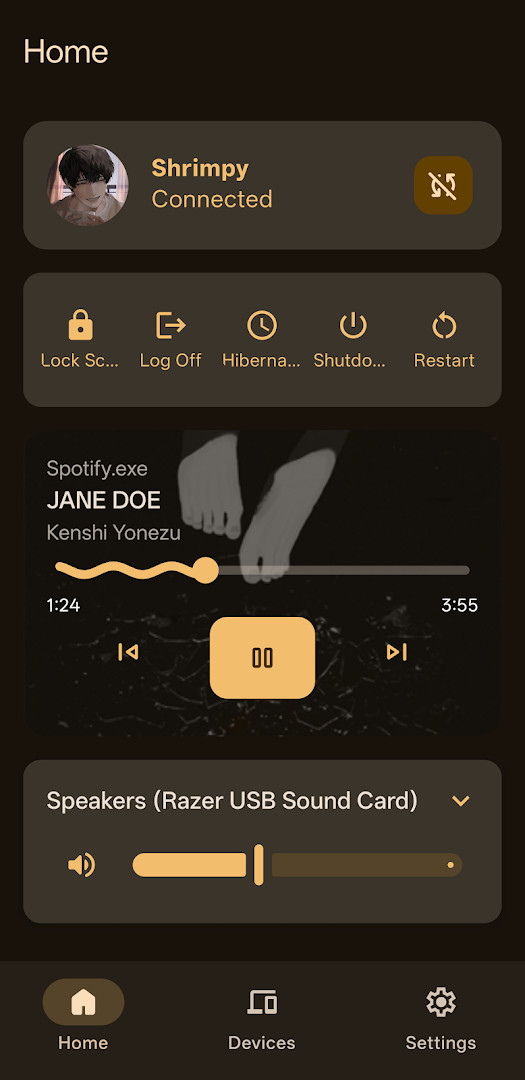
Download SefirahSefirah is designed for people who want to unify their Android phone and Windows PC into one workflow. It provides SMS synchronization, shared clipboard, notification sync, file sharing, storage access from Windows Explorer, and remote media control, with end-to-end TLS encryption.
Screenshots
- Size
- 12 MB
- Requires Android
- 6.0
- Updated
- Oct 14, 2026
- Installs
- 10K+
- Category
- Tools
- Developer
- shrimqy
- Content rating
- Everyone
- Package
- com.castle.sefirah
- Free
- ✓
Sefirah is a productivity app by shrimqy that connects an Android phone to a Windows PC for a more unified workflow. It addresses the common frustration of moving between a phone and a computer by bringing SMS, clipboard, notifications, files, and media controls into one shared experience. Instead of emailing yourself links or picking up the phone every time a message arrives, Sefirah lets you handle many of those tasks from the desktop. The app uses a companion Windows program and a secure local connection to keep everything in sync.
Key features
- View and reply to Android SMS messages from a Windows computer.
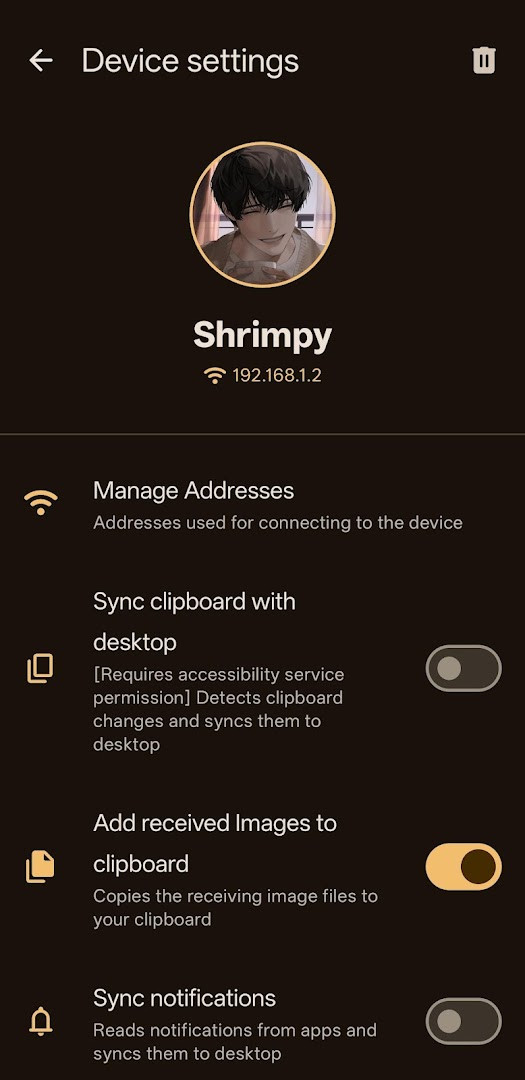
- Share clipboard content between your phone and PC for easy copy and paste.
- Receive Android notifications on the desktop.
- Send files and URLs between the phone and computer.
- Browse and manage the phone's shared storage directly from Windows Explorer.
- Use the phone as a remote control for desktop media players.
- Connect over a channel protected by end-to-end TLS encryption.
How to install
- Tap the download button on this page to get the Sefirah APK file.
- When Android asks, allow your browser or file manager to install apps by enabling the 'Install unknown apps' setting.
- Open the downloaded APK file from your notifications or file manager.
- Tap Install and wait for the process to finish; the app is about 12 MB in size.
- Make sure your device runs Android 6.0 or newer, then open Sefirah from your app drawer.
- Install the companion Windows application on your computer and pair both devices to start using the features.
Pros
- Free and open-source, with the source code available on GitHub.
- No ads and no in-app purchases.
- Offers a wide range of features beyond basic file transfer, including SMS, clipboard, and media control.
- Uses end-to-end TLS encryption for communication between devices.
- Storage integration makes the phone's shared storage browsable from Windows Explorer.
- Clipboard monitoring is optional and can be disabled from Android system settings.
Cons
- Requires a companion desktop application to function, so setup is not limited to the phone.
- Requests several permissions, including Contacts, Location, SMS, Phone, and Camera, which may feel excessive if you only need one or two features.
- Notification sync can be restricted on newer Android versions, where sensitive notifications may not appear without extra adb-based workarounds.
- Clipboard monitoring relies on the Accessibility service, which some users prefer to avoid even when the feature is optional.
- Keeping the desktop and Android versions aligned is important, so you may need to update both sides regularly.
Older versions
| Version | Size | Requires Android | Updated |
|---|---|---|---|
| 3.2.0 | 12 MB | 6.0 | Oct 14, 2026 |
| 3.1.0 | 12 MB | 6.0 | Aug 30, 2026 |
| 3.0.1 | 15 MB | 6.0 | Jul 24, 2026 |
Sefirah is suited for people who regularly switch between an Android phone and a Windows PC and want a free, open-source way to tie them together. It will appeal most to users who are comfortable installing a companion desktop program and do not mind granting a broader set of permissions in exchange for SMS, clipboard, notification, file, and media integration. Beginners can use it, but they should be prepared for a slightly more involved setup than a one-tap phone app.
For the smoothest experience, keep the Windows companion app updated to match the Android version. If you only want clipboard sharing, you can leave other permissions off and enable the Accessibility-based clipboard feature only when needed.
Permissions
FAQ
How does Sefirah handle clipboard monitoring, and is it always active?
Clipboard syncing is optional and only activates with your explicit consent. When enabled, the app uses the Accessibility service to detect a copy action and briefly reads the clipboard at that moment. The data is processed locally and shared only with your paired device, typically over the same local network. You can disable this feature anytime from Android system settings.
What can I do with Sefirah's storage integration?
You can browse and manage your Android device's entire shared storage directly from Windows Explorer, similar to a remote file system. This allows you to access and manage files on your phone from your PC without needing a direct cable connection.
Does Sefirah work with SMS and notifications on Android 15 and later?
SMS sync works, but for notifications, Android 15 imposes restrictions that hide sensitive notifications. The only workaround is to grant the required permission through adb. This limitation is specific to newer Android versions.
Why does Sefirah request location permission?
The location permission is used to check if your Android device is on a familiar network, which helps initiate automatic reconnection with your PC. It is not used for tracking or any other purpose.
What happens if I update the Android app but not the desktop companion?
For the latest features to work, you should keep the desktop version up-to-date with the Android version. If you don't, some newer features may not function correctly until both are updated.
Sefirah is a practical tool for anyone who wants a closer link between their Android phone and Windows computer. Its open-source nature and focus on local connections make it an interesting option if you want to keep your workflow flowing without adding another subscription to your list.
Similar apps








Updated: Oct 15, 2026