Samsung My Files: Smart File Manager
Samsung My Files is a free file manager by Samsung Electronics Co., Ltd. that lets you browse, organize, and free up storage on your device, SD cards, USB drives, and cloud services.
Download APKSamsung My Files is a 56 MB utility requiring Android 16 or newer. The app is free, with no ads or in-app purchases, and has earned a 4.07 rating from over 552,000 reviews. It is designed for anyone who needs to manage local and cloud files in one place, including support for Google Drive and OneDrive.
Screenshots
- Size
- 56 MB
- Requires Android
- 16
- Updated
- Jun 29, 2026
- Installs
- 5B+
- Rating
- ★ 4.08 (554,133)
- Category
- Tools
- Developer
- Samsung Electronics Co., Ltd.
- Content rating
- Everyone
- Package
- com.sec.android.app.myfiles
- Free
- ✓
Samsung My Files is a file management utility by Samsung Electronics Co., Ltd. that allows you to browse, organize, and access all files and folders stored on your Android device. It functions as a centralized hub for local storage, SD cards, USB drives, and connected cloud services, giving you direct control over your data without unnecessary intermediaries.
Beyond basic file operations like moving, copying, and deleting, the app includes tools to analyze storage consumption and free up space. It can identify large files, categorize content by type, and even show how much room different file formats are using within linked cloud accounts. This makes it particularly useful for users who want to maintain a lean, organized device without installing third-party cleanup utilities that might request excessive permissions.
The app is designed with Samsung's ecosystem in mind but remains functional for anyone on a compatible device. With a content rating of Everyone and no advertisements or in-app purchases, it presents a straightforward, distraction-free experience. Its recent updates have added quality-of-life improvements like password protection for compressed archives and the ability to manage favorites directly from search results.
Key features
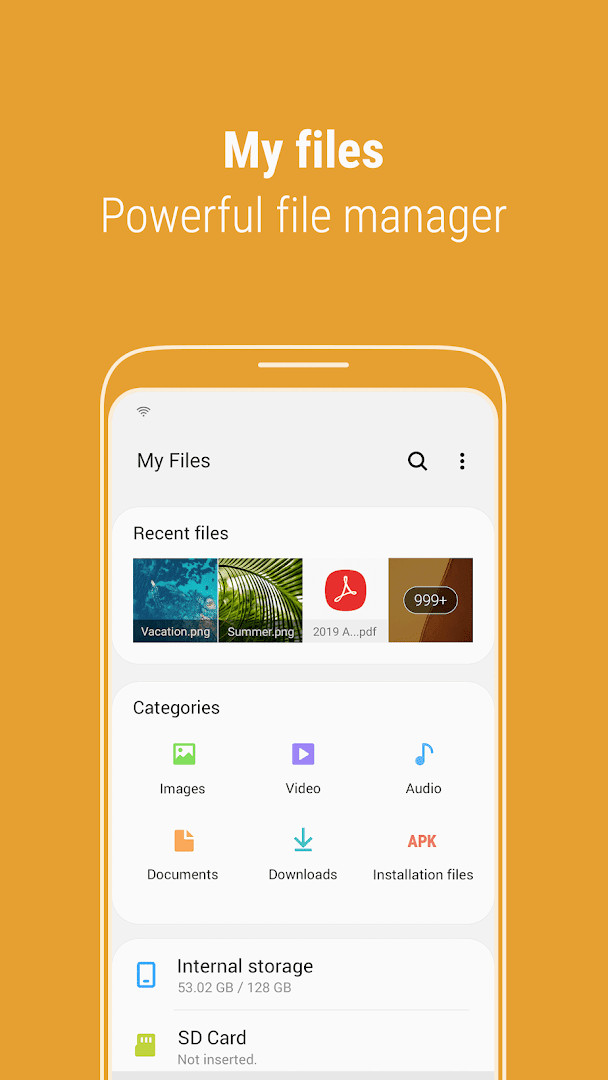
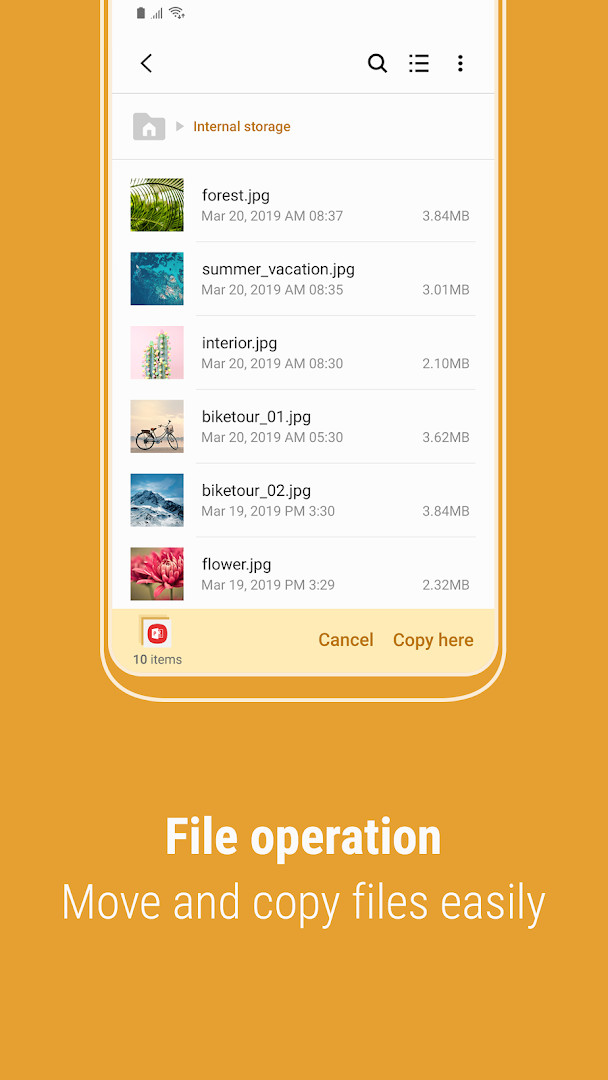
- Browse and manage files on internal storage, SD cards, and USB drives, with the ability to create folders, move, copy, share, compress, and decompress files.
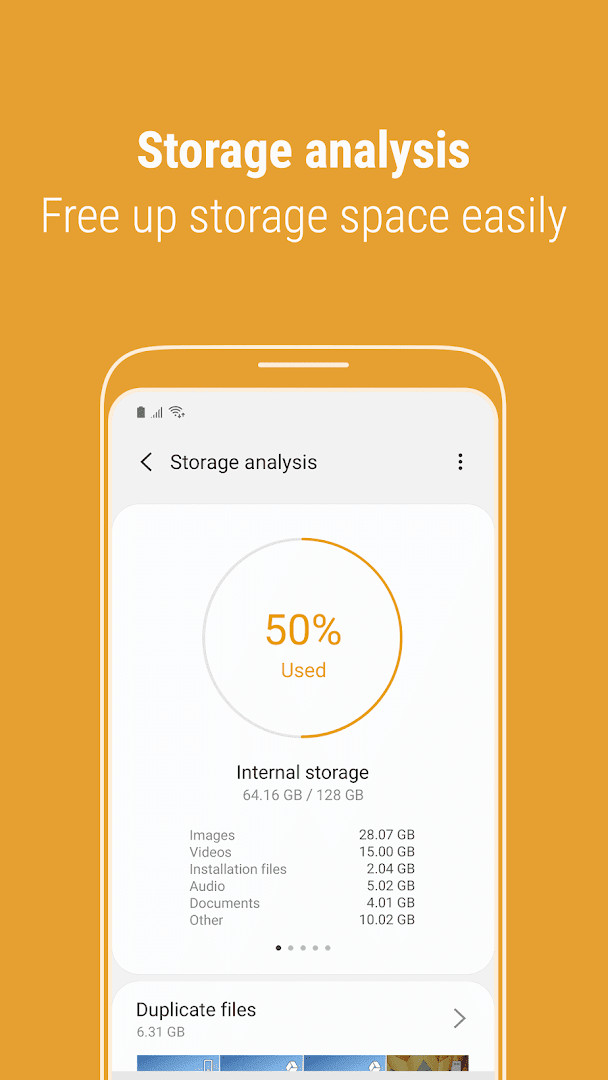
- Storage Analysis tool that identifies and helps free up space on the device and within connected cloud services like Google Drive and OneDrive.
- Customizable main screen allowing you to hide unused storage locations via the "Edit My Files home" option.
- List view mode that displays long file names without truncation or ellipses.
- Recent Files list and Categories list that automatically sort content into types such as documents, images, audio, video, and APK installation files.
- Password protection for compressed files, enabling secure zipping and unzipping of archives.
- Integration with cloud storage services, including Google Drive and OneDrive, for unified file management.
How to install
- Tap the download button on this page to get the 56 MB APK file.
- When Android prompts you, allow your browser or file manager to install apps by enabling the "Install unknown apps" setting for that application.
- Open the downloaded APK file from your notifications or file manager.
- Tap "Install" and wait for the process to complete.
- Open the app and grant the necessary permissions, such as Storage and Notifications, to begin managing your files. The app requires Android 16 or higher.
Pros
- Completely free with no advertisements or in-app purchases, reducing the risk of data harvesting for marketing purposes.
- Requested permissions are limited to core functionality: Storage for file access and Notifications for progress updates, with no unnecessary access to location or camera.
- Integrated storage analysis provides transparency into how your device space and cloud storage are being used without requiring a separate cleaner app.
- Password-protected compression adds a layer of security for sensitive files you wish to archive or share.
- Direct cloud integration allows you to manage Google Drive and OneDrive files without granting broad account permissions to multiple third-party apps.
Cons
- Requires the Contacts permission for full functionality, which may concern privacy-focused users who do not need contact-related file sharing features.
- Cloud storage analysis may involve data transmission to third-party servers like Google Drive and OneDrive, requiring trust in those platforms' privacy practices.
- Some advertised features are limited to specific Samsung models, creating an inconsistent experience across different devices.
- The app is not available for devices running Android versions below 16, limiting its use on older hardware.
Latest changes
The latest release brings three changes. While searching internal storage, you can now add or remove Favorites right away as you check the folder path. When you compress files, you can set a password for extra security, and password-protected archives can also be extracted. The storage analysis view now breaks down how much space is used by file type on OneDrive and Google Drive.
Older versions
| Version | Size | Requires Android | Updated |
|---|---|---|---|
| 15.6.03.3 | 56 MB | 16 | Oct 10, 2026 |
| 15.6.01.22 | 56 MB | 16 | Aug 10, 2026 |
| 15.6.00.74 | 56 MB | 16 | Jul 29, 2026 |
| 15.4.09.5 | 56 MB | 16 | Jun 28, 2026 |
| 15.2.04.2 | 19 MB | 14 | Jun 11, 2026 |
| 13.1.03.501 | 22 MB | 12 | Jun 15, 2025 |
| 15.0.04.5 | 18 MB | 13 | Apr 11, 2024 |
| 12.2.09.531 | 13 MB | 11 | Feb 21, 2023 |
| 11.5.08.531 | 12 MB | 10 | Jan 31, 2023 |
| 5.0.11.2 | 8.8 MB | 8.0 | Jun 26, 2022 |
This app is ideal for Samsung device users and anyone running Android 16 or higher who wants a reliable, ad-free file manager with integrated cloud support. It suits those who prioritize a clean interface and minimal permission requests over advanced features like root access or network-attached storage browsing.
If you are concerned about the Contacts permission, you can deny it and still use all core file management features; the permission is typically only needed for sharing files directly with specific contacts. Regularly using the Storage Analysis tool can help you spot large or forgotten files, especially cached data from other apps that might not be visible otherwise.
Permissions
FAQ
How do I install Samsung My Files on my Android device using the APK?
You can install the APK by using your device’s file manager to open the file, as long as installation from unknown sources is enabled in your security settings.
What is the latest version of Samsung My Files available?
The most recent update to the app was released on October 10, 2026, as version 15.6.03.3.
Does Samsung My Files contain ads or require any payments?
No, the app is completely free and does not display ads or offer any in-app purchases.
Can I manage my files with Samsung My Files when I am offline?
Offline use is not an issue; you can browse, move, copy, and create folders for all files stored on your smartphone or SD card without an internet connection.
What permissions does Samsung My Files need to work properly?
The app requires permissions to access your device storage, show notifications for file operations, and connect to Wi-Fi information. It may also use device history and contacts.
What new features were included in the recent My Files updates?
The latest update added secure password protection for compressing and unzipping files, and the storage analysis tool now shows usage details for connected cloud drives like OneDrive and Google Drive.
What are some alternatives to Samsung My Files for managing files?
There are several other file management utilities in the Tools category that offer similar functions for browsing, organizing, and transferring files on your device.
Samsung My Files is a capable native file manager that balances essential organization tools with cloud integration while requiring only a limited set of permissions. Its lack of advertisements and in-app purchases makes it a respectful choice for users who want a straightforward way to manage local and cloud storage without intrusive data collection. For Samsung device owners, it remains a practical and privacy-conscious default option.
Similar apps
 ClockSamsung Electronics Co., Ltd.3.9
 Voice RecorderSamsung Electronics Co., Ltd.4.0
 Samsung Smart Switch MobileSamsung Electronics Co., Ltd.3.9
 Samsung MusicSamsung Electronics Co., Ltd.3.8
 SmartThingsSamsung Electronics Co., Ltd.4.6
 Digital WellbeingGoogle LLC3.6
 Speech Recognition & SynthesisGoogle LLC4.0
 Android Accessibility SuiteGoogle LLC4.1
More from this developer


Updated: Oct 14, 2026